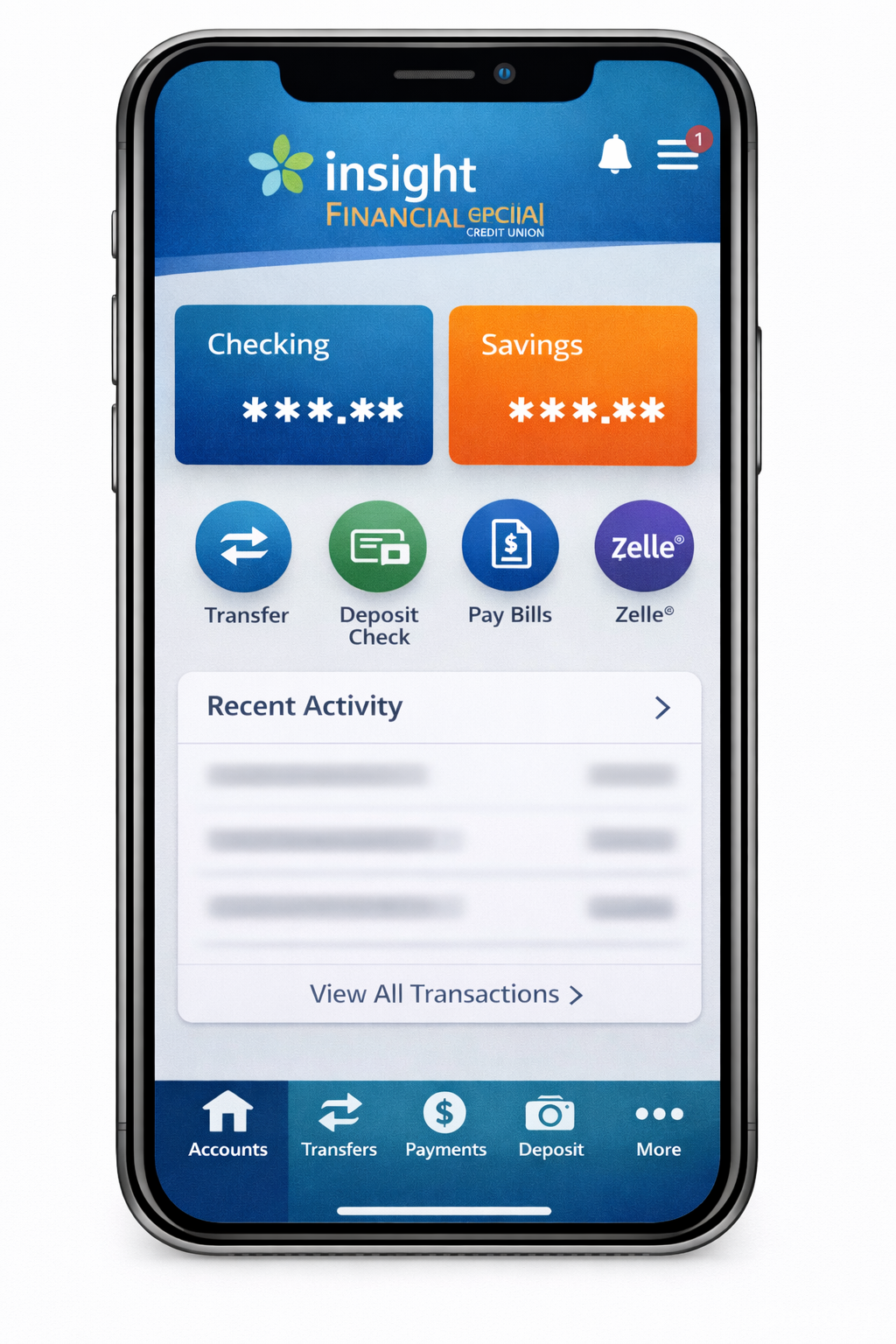
The Insight Financial Credit Union app is the official mobile banking platform for members of Insight Financial Credit Union. It provides a secure and convenient way to access accounts, deposit checks, transfer funds, pay bills, manage debit and credit cards, and receive real-time alerts. Available on both iOS and Android devices, the app is designed to simplify financial management for members anywhere, anytime.
The Insight Financial Credit Union app replicates the essential services of in-branch banking digitally. Members can view checking and savings balances, track loans and mortgages, and access electronic statements. By consolidating these services into a single platform, the app enables members to manage their finances efficiently while maintaining full control over their accounts.
Overview of Insight Financial Credit Union
Insight Financial Credit Union is a member-owned financial institution headquartered in the United States. Operating under cooperative principles, members are not just account holders but part-owners, giving them access to lower fees, competitive interest rates, and personalized financial services.
The Insight Financial Credit Union app allows members to utilize all these services digitally. Deposits made through the app are federally insured by the National Credit Union Administration up to standard coverage limits, ensuring members’ funds are secure while performing transactions remotely. The combination of cooperative ownership, comprehensive financial services, and mobile accessibility makes the app a valuable tool for modern banking.
Key Features of the Insight Financial Credit Union App
The Insight Financial Credit Union app offers a wide range of features to enhance mobile banking:
- Account Management – Check balances, view transaction history, and access eStatements in real-time.
- Mobile Check Deposit – Deposit checks remotely using the app’s camera feature with fast processing times and daily limits.
- Bill Pay & Fund Transfers – Schedule one-time or recurring payments, transfer funds internally or externally, and manage payees efficiently.
- Card Management – Lock or unlock debit/credit cards instantly, monitor transactions, and receive alerts.
- Real-Time Alerts – Customize notifications for account activity, low balances, and upcoming bills.
- Security & Authentication – Biometric login (Face ID or fingerprint), multi-factor authentication, and encrypted data ensure secure access.
Table 1: Insight Financial Credit Union App Features
| Feature | Available | Notes |
|---|---|---|
| Mobile Deposit | ✅ Yes | Deposit limits depend on account type |
| Bill Pay | ✅ Yes | Supports recurring payments |
| Card Lock/Unlock | ✅ Yes | Instant activation/deactivation |
| Biometric Login | ✅ Yes | Fingerprint or Face ID |
| Real-Time Alerts | ✅ Yes | Customizable notifications |
Key Takeaways
- The Insight Financial Credit Union app offers secure, full-service mobile banking for members.
- Available on iOS and Android with biometric login and encrypted security.
- Features include account management, mobile deposits, bill pay, card management, and alerts.
- Federally insured by the NCUA for peace of mind.
Also Read: First Financial Credit Union Mobile App – Secure & Convenient Banking Anytime
Pros & Cons
Pros:
- Secure mobile banking with encryption and multi-factor authentication
- Comprehensive features: mobile deposits, bill pay, alerts, and card management
- Free for members with 24/7 access
- Available on iOS and Android
Cons:
- Membership required to use the app
- Mobile deposit limits may apply
- Requires compatible smartphone or tablet
Setup, Security, Benefits & Troubleshooting
How to Download and Set Up the Insight Financial Credit Union App
The Insight Financial Credit Union app is available for free on both the Apple App Store and Google Play Store. To use the app, members must have an active account with Insight Financial Credit Union.
Step-by-Step Setup:
- Download the App – Open the App Store or Google Play, search for “Insight Financial Credit Union app,” and tap install.
- Register or Log In – Use your member number and online banking credentials to log in or register.
- Enable Security Features – Set up biometric authentication (Face ID or fingerprint) and create a secure passcode.
- Customize Alerts – Activate notifications for low balances, upcoming bills, or card activity.
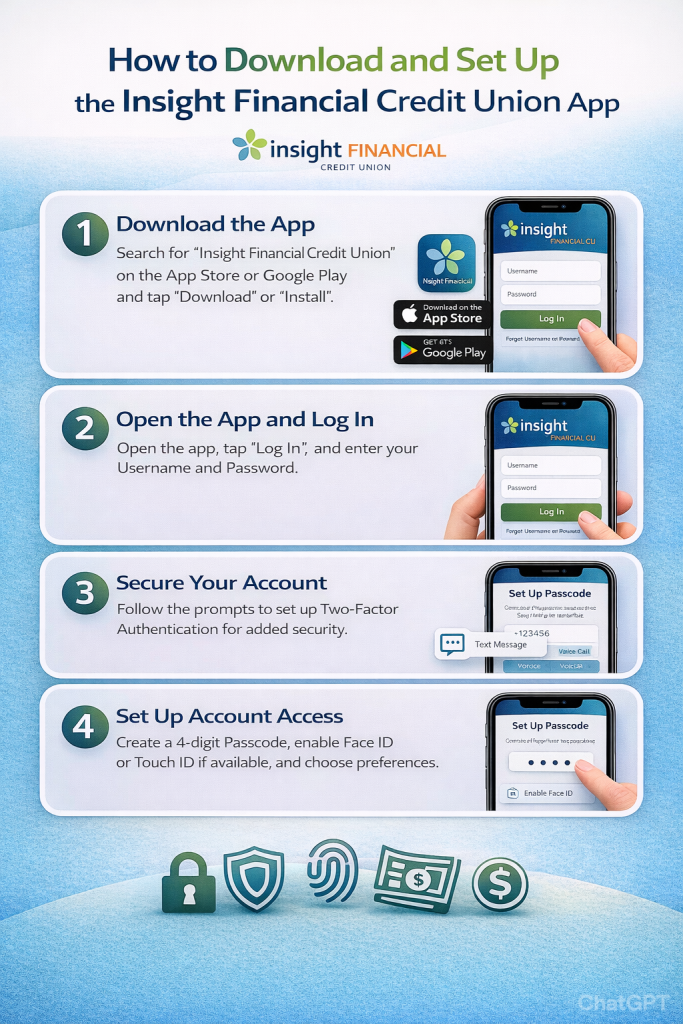
Table 1: Setup Requirements
| Requirement | Description |
|---|---|
| Membership Number | Active Insight Financial Credit Union account |
| Online Banking Enrollment | Required to log in |
| Device Compatibility | iOS 12+ / Android 8+ |
| Internet Connection | Wi-Fi or mobile data |
| Security Setup | Biometric login or passcode |
Security Measures of the Insight Financial Credit Union App
Security is a priority for the Insight Financial Credit Union app. Features include:
- Biometric Login – Fingerprint or Face ID ensures only the account holder can access the app.
- Multi-Factor Authentication (MFA) – Adds an extra verification step when logging in or performing high-value transactions.
- Data Encryption – All account information and transactions are encrypted using industry-standard protocols.
- Fraud Monitoring – Real-time alerts detect unusual account activity.
- NCUA Insurance – All deposits are federally insured by the National Credit Union Administration up to coverage limits.
Benefits of Using the Insight Financial Credit Union App
The Insight Financial Credit Union app provides a range of benefits:
- 24/7 access to account balances and transaction history
- Remote mobile deposits without visiting a branch
- Instant bill payments and internal/external transfers
- Real-time alerts for spending, deposits, and card activity
- Easy management of debit/credit cards
- Budgeting insights and spending analytics
Membership Eligibility & Account Requirements
The Insight Financial Credit Union app is exclusively available to members of Insight Financial Credit Union. To use the app, individuals must have an active membership and a valid checking, savings, or loan account. Membership eligibility is typically based on residence, employment, or association with partner organizations. Required documents include government-issued identification, proof of address, and account verification. Once enrolled, members gain access to all mobile banking features, including deposits, transfers, bill payments, and card management.
Mobile Deposit Tips & Best Practices
The Insight Financial Credit Union app allows convenient check deposits, but members can maximize success with a few tips. Ensure the check is endorsed correctly and lies flat when photographed. Use a well-lit area to capture clear front and back images. Be mindful of daily deposit limits, which vary by account type. Submitting blurry or incomplete images can delay processing. Regularly reviewing deposits in the app ensures accuracy and avoids errors.
Notifications & Personalization Features
The Insight Financial Credit Union app offers customizable notifications to help members stay informed. Users can receive alerts for low balances, large transactions, bill due dates, and suspicious account activity. The app also allows spending category tracking and budgeting notifications to help members manage finances effectively. By personalizing alerts, members can monitor their accounts without constant manual checks, enhancing security and convenience.
Integration With Digital Wallets & Payment Apps
The Insight Financial Credit Union app supports integration with popular digital wallets such as Apple Pay, Google Wallet, and Samsung Pay, enabling secure contactless payments. Members can also make person-to-person (P2P) transfers through supported payment networks. External accounts can be linked for seamless fund transfers, ensuring that users have a complete digital banking experience directly from their mobile device.
Common Issues and Troubleshooting
Even reliable apps can encounter issues. Here’s how to address them:
| Problem | Possible Cause | Solution |
|---|---|---|
| Login Failure | Incorrect credentials | Reset password via app or online banking |
| Mobile Deposit Rejection | Blurry image or limit exceeded | Retake photo; check deposit limits |
| App Crashes | Outdated version | Update to latest version |
| Transaction Delay | Network issues | Ensure stable internet connection |
| Biometric Login Not Working | Disabled permissions | Enable Face ID/Fingerprint in device settings |
Comparison With Other Credit Union Mobile Apps
| Feature | Insight Financial Credit Union App | Typical Credit Union App |
|---|---|---|
| Mobile Deposits | ✅ Yes | ✅ Yes |
| Bill Pay | ✅ Yes | ✅ Yes |
| Card Management | ✅ Yes | Sometimes |
| Biometric Login | ✅ Yes | Sometimes |
| Real-Time Alerts | ✅ Yes | ✅ Often |
| NCUA Insurance | ✅ Yes | ✅ Yes |
Takeaway: The Insight Financial Credit Union app is competitive, offering comprehensive features and strong security compared to other credit union apps.
Customer Support & Assistance
The Insight Financial Credit Union app includes built-in customer support options. Members can access FAQs, troubleshooting guides, and live chat directly in the app. For more complex issues, members may contact branch support or call the credit union’s dedicated helpline. This combination of digital and in-person support ensures users can resolve technical or account issues efficiently while maintaining uninterrupted access to their finances.
User Experience & Reviews
Members consistently rate the Insight Financial Credit Union app highly for ease of use, reliability, and comprehensive features. On the Apple App Store and Google Play Store, the app has received positive reviews for its intuitive interface, quick processing of deposits, and robust security measures. Users appreciate the convenience of mobile bill pay and real-time alerts, making it a top choice for credit union members seeking modern digital banking solutions.
FAQs
- Is the Insight Financial Credit Union app free?
Yes, it is free for all active members with a valid account. - How do I deposit a check using the app?
Open the app, select “Deposit Check,” take photos of the front and back, and submit. Ensure the images are clear and within deposit limits. - How secure is the Insight Financial Credit Union app?
It uses encryption, multi-factor authentication, biometric login, and NCUA-insured deposits to protect accounts. - What are mobile deposit limits?
Deposit limits vary by account type. Members can check limits within the app or contact customer service. - Can non-members use the app?
No, only Insight Financial Credit Union members with an active account can use the app. - Does the app support Zelle or P2P transfers?
Yes, it supports secure person-to-person transfers where available. - How do I reset my password?
Use the “Forgot Password” option in the app or log in to online banking to reset your password securely.
Summary
- The Insight Financial Credit Union app allows members to perform full-service mobile banking with convenience and security.
- Setup is simple, with registration, biometric login, and alert customization.
- Security features include encryption, multi-factor authentication, fraud monitoring, and NCUA insurance coverage.
- Offers 24/7 access, mobile deposits, bill pay, card management, and budgeting insights.
- Strong competitor in mobile credit union banking apps for usability, security, and member-focused features.
References
- Insight Credit Union App on Apple App Store (official mobile banking app)
- Insight Credit Union App on Google Play Store (Android version)
- Insight Credit Union Digital Banking Info (mobile banking features)
- Insight Credit Union Access Page (mobile and online access overview)
- Insight Credit Union Digital Banking FAQs (registration, features, security)
- Insight Credit Union – Wikipedia (institution background, NCUA insurance context)
Disclaimer:
The content provided is for informational purposes only and does not constitute financial, investment, legal, or tax advice. While efforts are made to ensure accuracy, no guarantees are given regarding completeness or reliability. Any action you take upon the information is strictly at your own risk. We recommend consulting a licensed financial advisor or professional before making financial decisions.