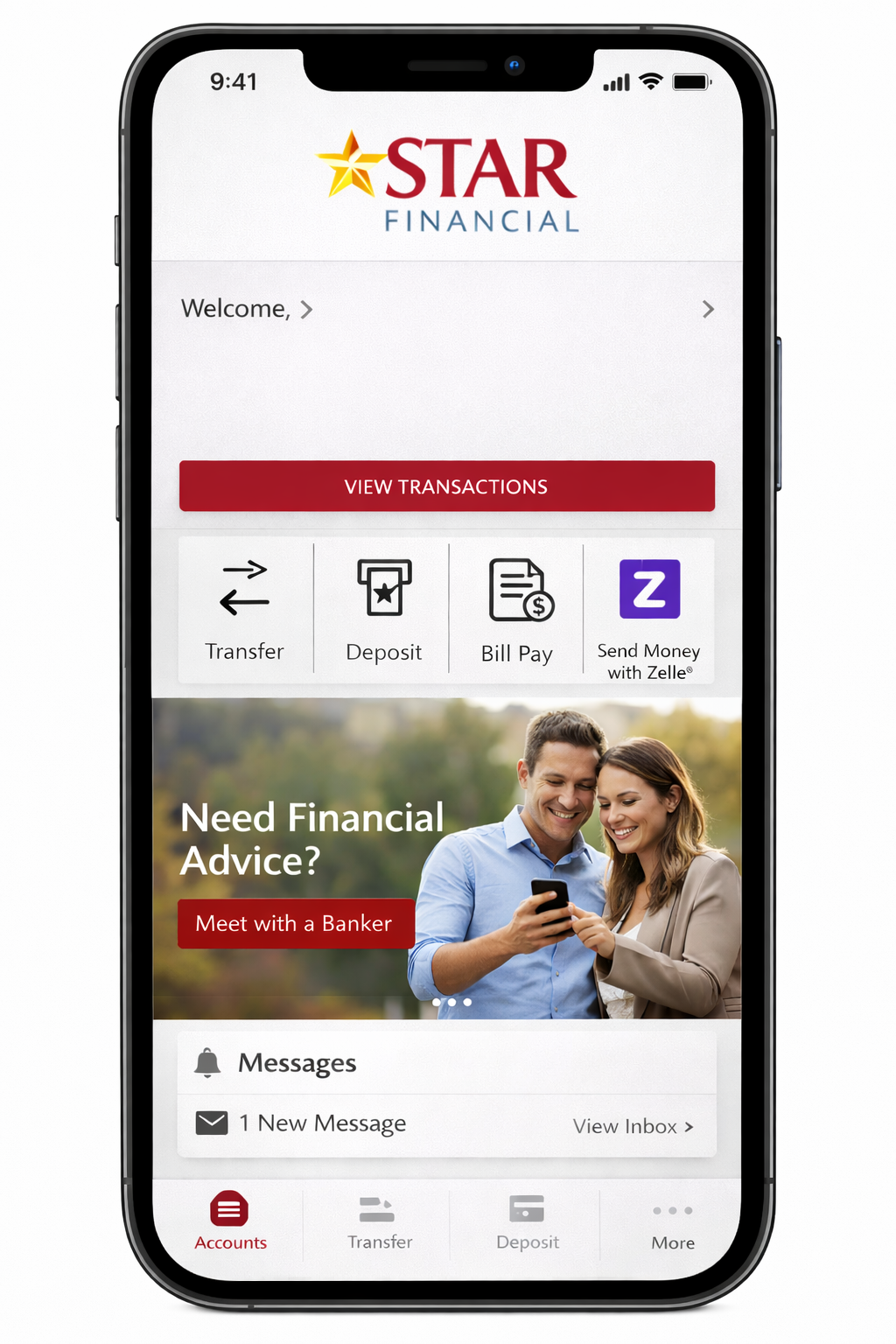
The Star Financial mobile app is the official digital banking platform of STAR Financial Bank. It allows customers to check balances, deposit checks, transfer funds, pay bills, and send money through Zelle. The app is available on iOS and Android and includes multi-factor authentication and biometric security features.
STAR Financial Bank
STAR Financial Bank is a U.S.-regulated community bank offering personal and business banking services. As an FDIC-insured institution, deposits are protected by the Federal Deposit Insurance Corporation up to standard federal limits.
The mobile app functions as the bank’s primary digital access channel, allowing customers to manage accounts without visiting a branch.
What Problem Does the App Solve?
Customers searching for “star financial mobile app” typically want to:
- Access accounts without visiting a branch
- Deposit checks remotely
- Transfer money quickly
- Monitor transactions in real time
- Ensure their banking activity is secure
The app addresses these needs through core mobile banking capabilities aligned with U.S. digital banking standards.
Platforms Supported
The app is available on:
- Apple App Store
- Google Play Store
Supported authentication methods include:
- Face ID (iOS devices)
- Touch ID / Fingerprint login (iOS & Android)
- Multi-factor authentication codes
What Can You Do With the Star Financial Mobile App?
The Star Financial mobile app lets users perform essential mobile banking tasks on the go. Through the app, customers of STAR Financial Bank can check real-time balances, view transaction history, and manage multiple accounts. It supports mobile check deposit, scheduled bill pay, and person-to-person transfers via Zelle. Users can also set alerts, control debit cards, and locate branches or ATMs. These features make everyday banking faster, more convenient, and fully accessible from iOS or Android devices.
Account Monitoring & Real-Time Balances
Users can:
- View checking and savings balances
- Review transaction history
- Track pending payments
- Monitor loan balances (if applicable)
- Access eStatements
Real-time balance access helps prevent overdrafts and improves spending awareness (based on digital banking best practices).
Mobile Check Deposit (Remote Deposit Capture)
The app supports remote check deposit, allowing users to submit checks using their phone camera.
How It Works:
- Endorse the check
- Capture front and back images
- Submit via app
- Receive confirmation
Benefits:
- No branch visit required
- Faster deposit processing
- 24/7 submission availability
Deposit limits vary depending on account type and history, consistent with industry policies.
Bill Pay & Scheduled Payments
The built-in bill pay system enables:
- One-time payments
- Recurring payment scheduling
- Payment history tracking
- Due-date reminders
Automated payments reduce late fees and improve financial management efficiency.
Peer-to-Peer Payments (Zelle Integration)
The app integrates with Zelle, enabling:
- Instant money transfers
- Payments using email or mobile number
- Bank-to-bank transfers within the U.S.
Zelle integration aligns the app with modern U.S. banking expectations.
Card Controls & Fraud Alerts
Users can manage debit cards directly through the app:
- Freeze or unfreeze cards
- Set transaction alerts
- Monitor unusual spending
- Report lost or stolen cards
Fraud alert systems use transaction monitoring models consistent with industry risk detection standards.
Alerts & Notifications
Customers can customize alerts for:
- Low balance warnings
- Large transactions
- Deposit confirmations
- Failed payments
- Suspicious activity
Real-time notifications improve financial visibility and fraud response speed.
Also Read: Hong Kong Local Financial App Ranking 2026 – Top Banking & Wallet Apps Compared
Feature Breakdown Table
| Feature | Available | Customer Benefit | Decision Impact |
|---|---|---|---|
| Balance Monitoring | Yes | Real-time visibility | High |
| Mobile Deposit | Yes | Remote convenience | High |
| Bill Pay | Yes | Automated payments | Medium |
| Zelle Transfers | Yes | Instant P2P payments | High |
| Card Controls | Yes | Fraud prevention | High |
| Alerts | Yes | Spending awareness | High |
| Branch Locator | Yes | Hybrid banking access | Medium |
Is the Star Financial Mobile App Safe?
Security is a major concern when choosing a mobile banking app, and the Star Financial mobile app follows U.S. banking security standards. Offered by STAR Financial Bank, it uses encrypted data transmission, Multi-factor authentication, and biometric login to protect user accounts. Deposits are insured by the Federal Deposit Insurance Corporation up to federal limits. The app also includes fraud monitoring and real-time alerts, meeting standard digital banking security expectations.
Encryption & Secure Data Transmission
The app uses encrypted data transmission protocols consistent with U.S. financial institution standards. Encryption protects:
- Login credentials
- Account numbers
- Payment details
- Personal information
According to industry standards, secure TLS encryption is mandatory for mobile banking platforms.
Multi-Factor Authentication (MFA)
The app supports Multi-factor authentication, adding an extra layer of protection beyond passwords.
Typical verification layers include:
- Password
- One-time code
- Device recognition
- Biometric confirmation
MFA significantly reduces unauthorized access risk (based on cybersecurity benchmarks).
Biometric Login
Biometric authentication options include:
- Face recognition (iOS)
- Fingerprint authentication (iOS & Android)
Biometrics improve convenience without reducing security strength.
FDIC Insurance Coverage
Deposits held with Federal Deposit Insurance Corporation insured banks are protected up to standard federal limits per depositor, per ownership category.
Important distinction:
- FDIC insurance covers bank failure
- It does not cover fraud resulting from compromised credentials
Fraud Monitoring & Transaction Alerts
The app incorporates:
- Real-time transaction monitoring
- Suspicious activity detection
- Card-based fraud controls
- Immediate push notifications
These measures align with U.S. banking compliance frameworks.
Security Checklist Table
| Security Layer | Included | Industry Standard |
|---|---|---|
| Encrypted Transmission | Yes | Required |
| Multi-Factor Authentication | Yes | Recommended |
| Biometric Login | Yes | Common Practice |
| Fraud Alerts | Yes | Standard |
| FDIC Insurance | Yes | Mandatory for insured banks |
Internal Security Summary
Security Overview:
- Encrypted connections
- Multi-factor login
- Biometric authentication
- Fraud monitoring systems
- FDIC-insured deposits
The security structure aligns with baseline U.S. digital banking expectations.
How to Download and Set Up the App
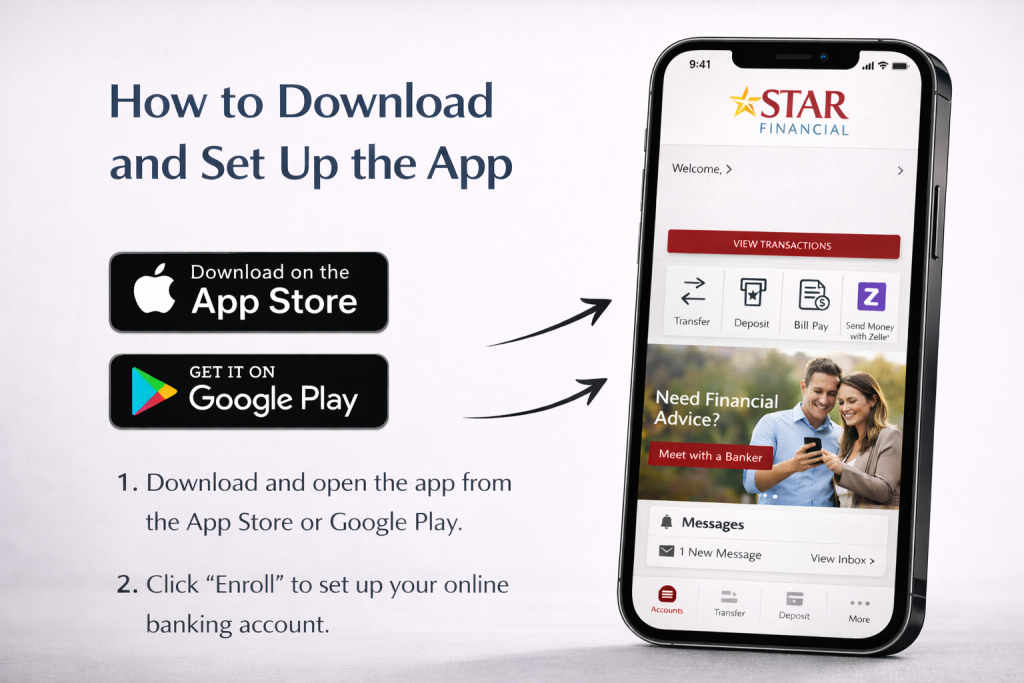
Step 1: Download
- Visit the Apple App Store or Google Play Store
- Search: “Star Financial Mobile”
- Verify publisher: STAR Financial Bank
- Tap install
Step 2: Register or Log In
To activate:
- Enter online banking credentials
- Complete MFA verification
- Set up biometric login (optional)
- Configure alerts
Existing online banking enrollment is generally required.
Step 3: Troubleshooting Login Issues
Common solutions:
- Reset password via official website
- Update app to latest version
- Clear device cache
- Check internet connection
- Contact bank support if persistent
Login issues are common across digital banking platforms during OS updates or maintenance windows.
Summary
The Star Financial mobile app provides:
- Core mobile banking functionality
- Secure authentication methods
- Mobile check deposit
- Zelle transfers
- Card controls and fraud monitoring
- FDIC-backed deposit protection
It delivers standard community bank digital capabilities with strong baseline security protections.
User Experience, Performance & App Reliability
Interface & Navigation Structure
The Star Financial mobile app follows a conventional U.S. mobile banking layout designed for clarity and fast access.
Typical dashboard structure includes:
- Account summary at the top
- Recent transactions below
- Bottom navigation menu (Accounts, Transfer, Deposit, Pay, More)
- Quick-access buttons for mobile deposit and transfers
Community bank apps prioritize usability over feature layering. The layout reduces cognitive load and ensures:
- Fast balance visibility
- Simple transfer execution
- Clear transaction review
This structure aligns with mobile banking UX standards focused on efficiency and trust.
App Speed & Stability
Mobile banking performance is evaluated based on:
- Login load time
- Transaction processing speed
- Crash frequency
- Biometric response time
Apps distributed via the Apple App Store and Google Play Store receive periodic updates for:
- Security patches
- Operating system compatibility
- Bug fixes
- Performance optimization
Regular updates are a positive signal of active maintenance.
Common User Experience Concerns
Based on industry patterns, common issues across banking apps include:
- Temporary login lockouts
- Password reset confusion
- Delayed mobile deposit holds
- OS update incompatibility
These issues are not unique to one institution but reflect broader digital banking challenges.
Star Financial Mobile App vs Other Banking Apps
Customers evaluating the app often compare it against:
- Large national banks like Chase Bank
- Other regional community banks
- Digital-only banking platforms
Understanding the differences helps users make informed decisions.
Feature Comparison Table
| Feature | Star Financial | National Bank App | Digital-Only Bank |
|---|---|---|---|
| Mobile Deposit | Yes | Yes | Yes |
| Zelle Integration | Yes | Yes | Sometimes |
| Branch Access | Yes | Yes | No |
| Advanced Budget Tools | Limited | Moderate | Strong |
| Investment Integration | Limited | Extensive | Limited |
| In-App Live Chat | Limited | Yes | Yes |
| FDIC Insurance | Yes | Yes | Yes |
Key Competitive Differences
1. Branch Integration Advantage
Unlike digital-only banks, the app supports hybrid banking through branch and ATM access tied to STAR Financial Bank.
2. Feature Depth
National banks often provide:
- Integrated credit score tracking
- Advanced budgeting analytics
- Investment dashboards
- Broader financial ecosystem tools
Community bank apps typically focus on:
- Reliable account management
- Secure transactions
- Core banking services
3. Digital Innovation Gap
Fintech-focused banks tend to lead in:
- Automated savings tools
- Spending categorization
- Financial goal tracking
Community bank apps prioritize security and operational reliability.
Pros and Cons
Advantages
- Backed by a regulated U.S. bank
- Deposits insured by the Federal Deposit Insurance Corporation
- Secure login with Multi-factor authentication
- Biometric authentication supported
- Integrated Zelle transfers
- Mobile check deposit functionality
- Branch locator integration
Limitations
- Limited advanced budgeting tools
- Fewer investment management features
- Smaller digital ecosystem compared to national banks
- May lack robust in-app live support
Pros & Cons Summary Box
Best For:
- Existing STAR Financial customers
- Users who value branch access
- Customers seeking secure, core banking tools
Less Ideal For:
- Users seeking fintech-style analytics
- Heavy investment management users
- Customers wanting advanced automation tools
Who Should Use the Star Financial Mobile App?
Ideal Users
- Personal checking account holders
- Savings account customers
- Small business owners tracking transactions
- Customers located near STAR branches
- Users prioritizing security and simplicity
Users Who May Prefer Alternatives
- Users wanting robo-advisory investment tools
- Customers seeking advanced AI-driven budgeting
- Users needing multi-bank financial aggregation tools
The app is built for stability and core banking reliability rather than fintech expansion.
Is the Star Financial Mobile App Safe?
The Star Financial mobile app is designed to meet standard U.S. digital banking security requirements. Provided by STAR Financial Bank, the app uses encrypted data transmission, secure login protocols, and Multi-factor authentication to protect user accounts.
Security Evaluation Summary
The app includes:
- Encrypted data transmission
- Multi-factor authentication
- Biometric login
- Real-time fraud alerts
- Debit card controls
- FDIC insurance coverage
Under U.S. banking regulations, insured institutions must meet baseline cybersecurity and compliance requirements.
Important distinction:
- FDIC insurance protects against bank failure
- It does not reimburse losses from credential compromise
Security remains a shared responsibility between the institution and the user.
Is the Star Financial Mobile App Worth Downloading?
The answer depends on customer expectations.
It Is Worth Downloading If:
- You are already a STAR Financial customer
- You want secure account monitoring
- You need mobile check deposit
- You use Zelle frequently
- You prefer branch-backed banking
It May Not Be Ideal If:
- You want advanced investment integration
- You prefer digital-only banking ecosystems
- You need automated financial insights
Overall, the app delivers strong foundational mobile banking aligned with community bank standards.
Conclusion
The Star Financial mobile app provides secure, regulation-compliant mobile banking through STAR Financial Bank.
It offers:
- Real-time account monitoring
- Mobile deposit capability
- Bill pay services
- Zelle transfers
- Card controls
- Fraud monitoring
- FDIC-insured deposit protection
While it does not compete with national banks in advanced financial analytics, it fulfills essential mobile banking needs with strong security and reliability.
For existing customers, it functions as a dependable digital extension of branch banking.
Frequently Asked Questions (FAQs)
1. Is the Star Financial mobile app free?
Yes. The app is free to download from official app stores. Standard banking or transaction fees may apply based on account type.
2. Does the app support Zelle?
Yes. The app integrates with Zelle, allowing users to send and receive money with participating U.S. banks.
3. Is STAR Financial Bank FDIC insured?
Yes. Deposits are insured by the Federal Deposit Insurance Corporation up to standard federal limits per depositor, per ownership category.
4. Can I deposit checks using the app?
Yes. The app supports mobile check deposit through remote deposit capture functionality.
5. Why is the Star Financial mobile app not working?
Common causes include:
- Outdated app version
- Poor internet connection
- Incorrect login credentials
- Temporary maintenance
Updating the app and resetting login credentials often resolves issues.
6. How does it compare to national bank apps?
National banks like Chase Bank often provide broader investment tools and analytics. The Star Financial app focuses on secure core banking and branch integration.
7. Is it safe to use the Star Financial mobile app?
Yes. It includes encryption, multi-factor authentication, biometric login, fraud monitoring, and FDIC-backed deposit protection aligned with U.S. banking standards.
References:
STAR Financial Bank
Official mobile banking information page – includes app features (manage accounts, mobile deposit, bill pay, alerts).
👉 https://www.starfinancial.com/personal/digital-banking/mobile-app
Official main website (general banking products & digital access info).
👉 https://www.starfinancial.com/
Disclaimer:
The content provided is for informational purposes only and does not constitute financial, investment, legal, or tax advice. While efforts are made to ensure accuracy, no guarantees are given regarding completeness or reliability. Any action you take upon the information is strictly at your own risk. We recommend consulting a licensed financial advisor or professional before making financial decisions